Why write a post about changing Windows passwords programmatically when so many built-in and third-party tools already let us do it effortlessly? The answer is simple: curiosity. It drives us to understand the underlying mechanisms of the systems we interact with, explore hidden parts, and sometimes even uncover unintended behaviors or security flaws. This post isn’t just about changing passwords; I tried to “embrace” the hacker mindset, diving into system internals and sharing my journey.
Disclaimer: What I’m writing about has maybe been documented elsewhere. I’m hardly a genius or a world-class security researcher with a mind sharper than a quantum computer. All I have is curiosity, decades of experience, and an undying love for diving deep despite being at an age where I should probably be more focused on retirement and leisurely activities. 😔
The easy way
Besides using ready-made tools, one of the API calls that performs all the magic is NetUserSetInfo in NetApi32.dll, the same call used by many tools behind the scenes.
It uses the (old) MS-SAMR protocol, which permits you to change local and Domain Accounts, along with MS-ADTS, MS-KILE, MS-NRPC, etc…
A detailed description of NetUserSetInfo can be found here. In our case, we are more interested in the USER_INFO_1003 structure:
typedef struct _USER_INFO_1003 {
  LPWSTR usri1003_password;
} USER_INFO_1003, *PUSER_INFO_1003, *LPUSER_INFO_1003;
Which is used for changing the password of a specific account:
userInfo.usri1003_password = (wchar_t*)new_password;

// Call NetUserSetInfo to update the password
ret= NetUserSetInfo(server, account, 1003, (LPBYTE)&userInfo, NULL);
That’s it! You can change any user or computer account password on any machine. If the server is a Domain Controller, the AD password will be updated; otherwise, the password stored in the local SAM database will be changed.
the complex way
But what’s happening behind the scenes? A quick Wireshark analysis, filtered for the SAMR protocol, reveals the process in action:
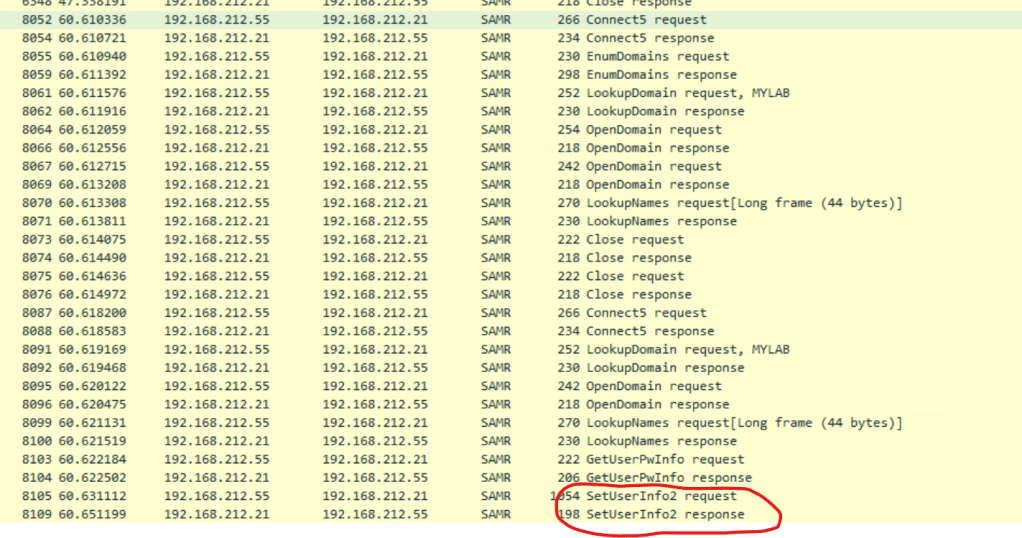
It uses the SetUserInfo2 RPC call to communicate with the destination server. This call is part of the MS-SAMR protocol and is defined in the IDL file
 // opnum 58
 long
 SamrSetInformationUser2(
     [in] SAMPR_HANDLE UserHandle,
     [in] USER_INFORMATION_CLASS UserInformationClass,
     [in, switch_is(UserInformationClass)]
         PSAMPR_USER_INFO_BUFFER Buffer
     );
We are interested in the USER_INTERNAL8_INFORMATION
  typedef struct _SAMPR_USER_INTERNAL8_INFORMATION
  {
      SAMPR_USER_ALL_INFORMATION I1;
      SAMPR_ENCRYPTED_PASSWORD_AES UserPassword;
  } 	SAMPR_USER_INTERNAL8_INFORMATION;
the UserPassword is defined as follows:
 typedef struct _SAMPR_ENCRYPTED_PASSWORD_AES
 {
     UCHAR AuthData[64];
     UCHAR Salt[16];
     ULONG cbCipher;
     PUCHAR Cipher;
     ULONGLONG PBKDF2Iterations;
 } 	SAMPR_ENCRYPTED_PASSWORD_AES;
The new password must be encrypted with AES before being sent to the server.
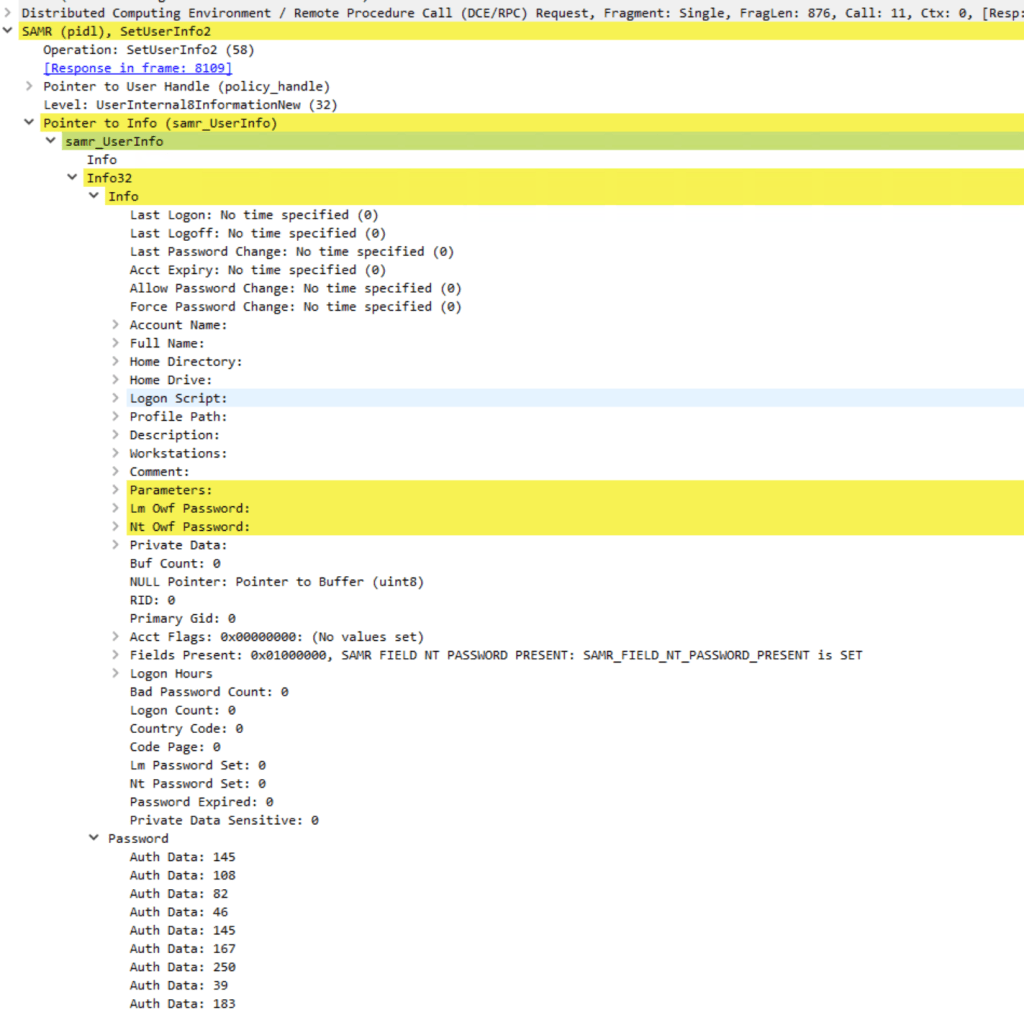
Now let’s take a closer look at how we can get there:
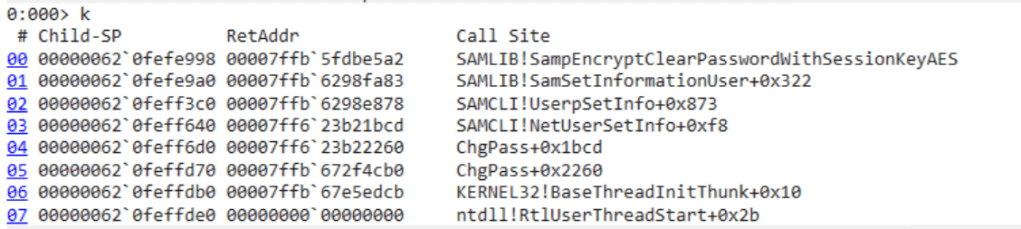
The function SampEncryptClearPasswordWithSessionKeyAES seems to do all the magic, but it’s not exported in samlib.dll:
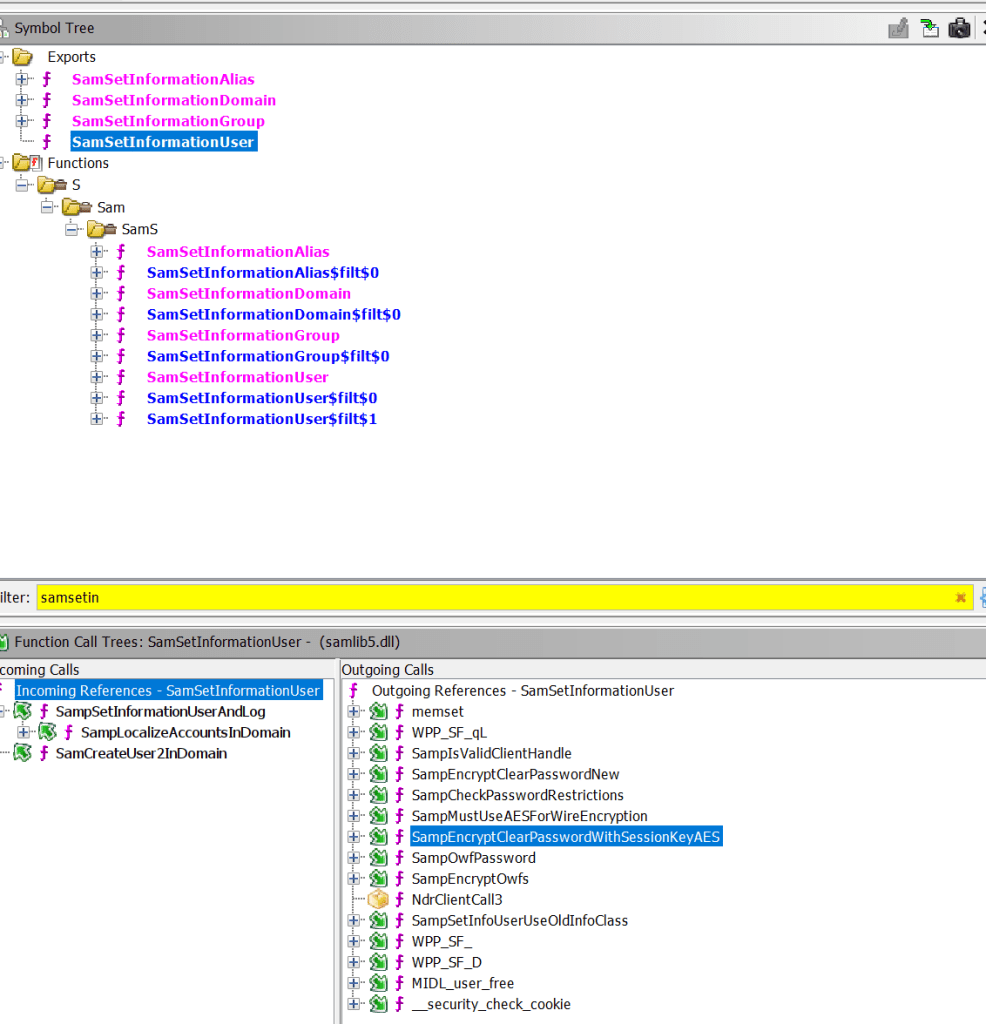
Note: Before calling SampEncryptClearPasswordWithSessionKeyAES, several other function calls are made, such as verifying password restrictions and checking whether AES should be used. However, we can safely skip them for our purpose.
Loading a function that is not exported should not be a big problem; we could search for specific patterns in the DLL to get the function address:
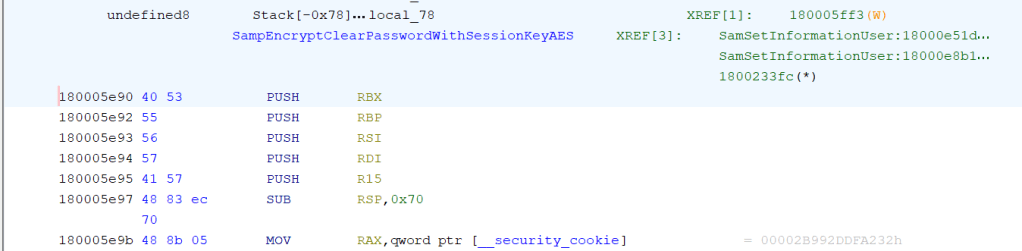
And these patterns would be enough:
BYTE pattern[] = { 0x40, 0x53, 0x55, 0x56, 0x57, 0x41, 0x57, 0x48, 0x83, 0xEC,0x70,0x48,0x8b };
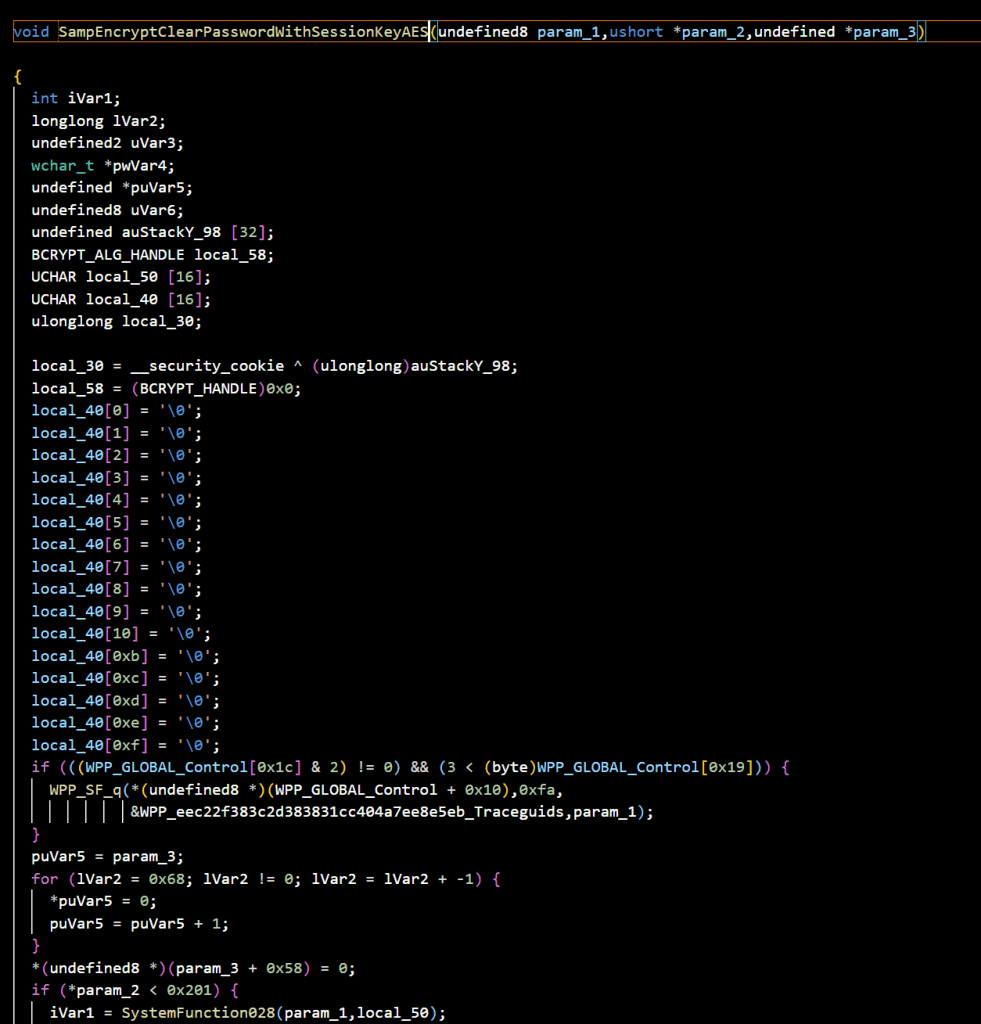
But what parameters should we pass to the function? By reversing the function into pseudo-C code using Ghidra, we can see that the first parameter is the handle of the user account we want to modify. This is evident because it is passed to SystemFunction028(), which returns the SMB session key (more on later).
The second and the third parameters are the cleartext password and the resulting encrypted password passed to the function SampEncryptClearPasswordAESWorker():
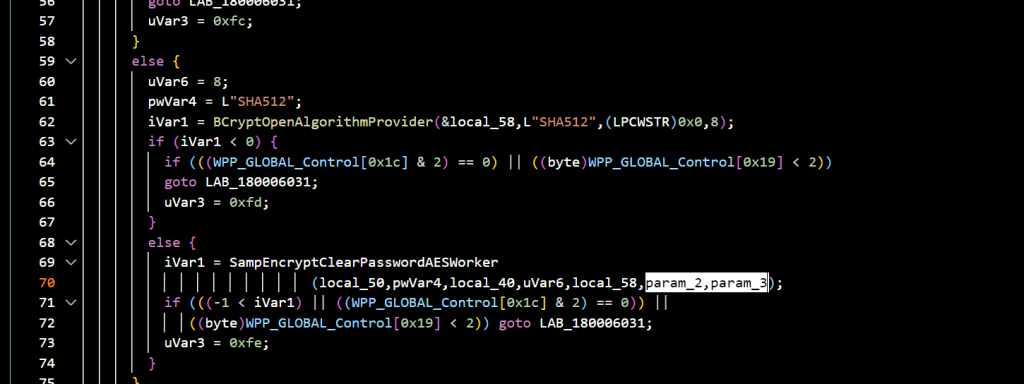
After analyzing the code and conducting several tests, it turned out that the input password is a pointer to a UNICODE_STRING, while the output is a pointer to the SAMPR_ENCRYPTED_PASSWORD_AES structure we encountered earlier.
At this point, we have all the pieces we need:
- Open a connection to the server using SamrConnect5().
- Open a connection to the domain with SamrOpenDomain(), passing the domain SID.
- Open a connection to the target user with SamrOpenUser(), passing the user’s RID to obtain the userHandle of the target user.
- Create a UNICODE_STRING (
uString) containing the new password. - Declare a SAMPR_ENCRYPTED_PASSWORD_AES (
uAES). - Locate and load the non-exported SampEncryptClearPasswordWithSessionKeyAES function.
- Pass all these parameters to SampEncryptClearPasswordWithSessionKeyAES(userHandle, &uString, &uAES).
If everything works correctly, we should get a populated uAES structure.
Now, we just need to:
- Declare a SAMPR_USER_INTERNAL8_INFORMATION variable.
- Assign uAES to UserPassword.
- Set SAMPR_USER_ALL_INFORMATION to
1, which indicates that we want to change the NT password.
memset(&us, 0, sizeof(us));
memcpy(us.Internal8.UserPassword.Salt, uAES.Salt, 16);
memcpy(us.Internal8.UserPassword.AuthData, uAES.AuthData, 64);
us.Internal8.UserPassword.cbCipher = uAES.cbCipher;
us.Internal8.UserPassword.PBKDF2Iterations = 0;
us.Internal8.I1.WhichFields = toBigEndian(1);
us.Internal8.UserPassword.Cipher = uAES.Cipher
status = SamrSetInformationUser2(userHandle, (USER_INFORMATION_CLASS)32, &us);
But during the compilation, we will get an error:
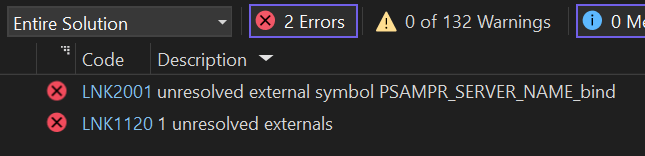
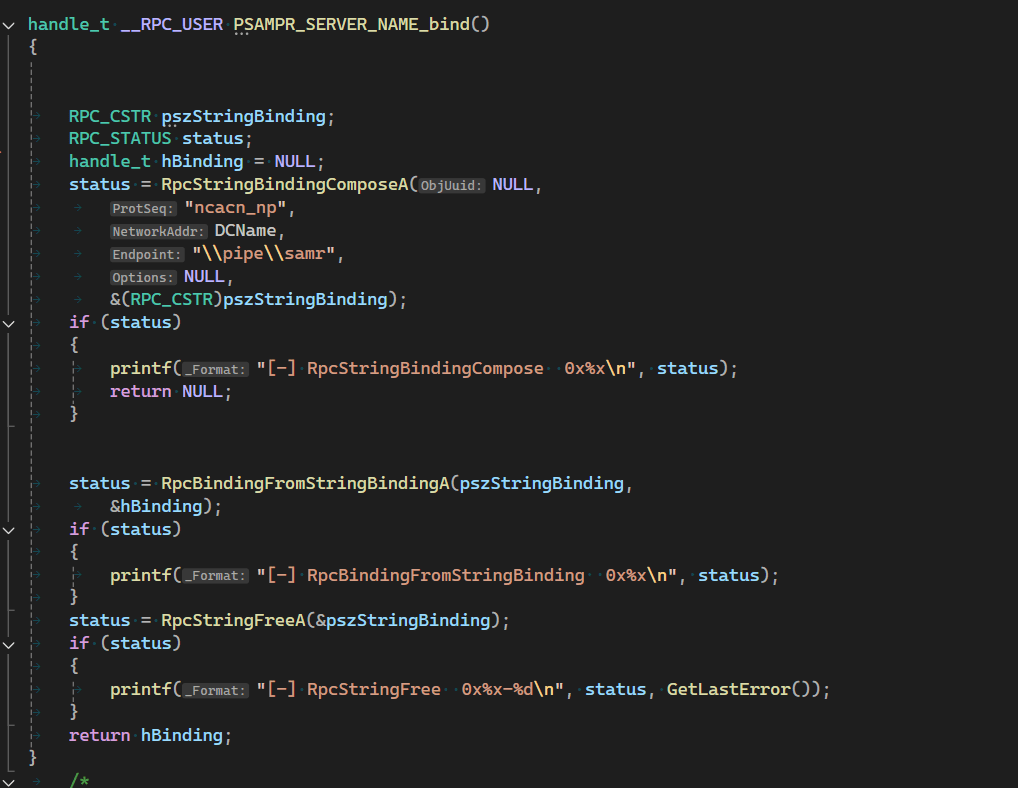
We are missing the PSAMPR_SERVER_NAME_bind() function, which should handle the RPC connection. In fact, this function is in the samlib.dll but not exported, and I could not find any incoming calls to this one. Anyway, we have to setup the transport and this could be performed directly by us. As written in the MS-SAMR Transport section, if we want to use SamrSetInformationUser2 we have to use named pipes ncacn_np as the protocol sequence and the \pipe\samr endpoint
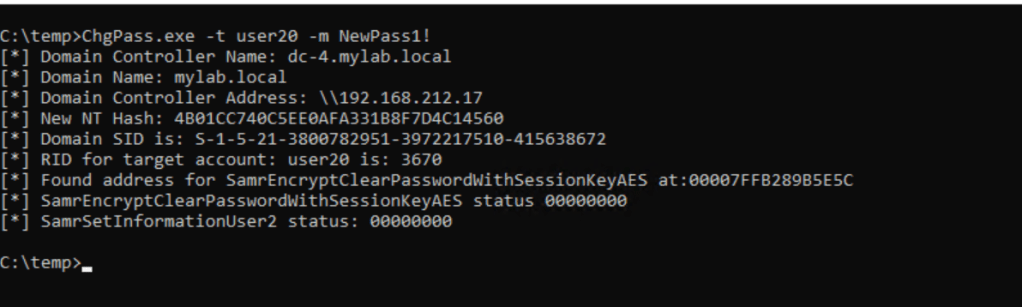
And finally, it worked 😉
Let’s test if we can bypass password restrictions given that we omitted all the validation calls before:
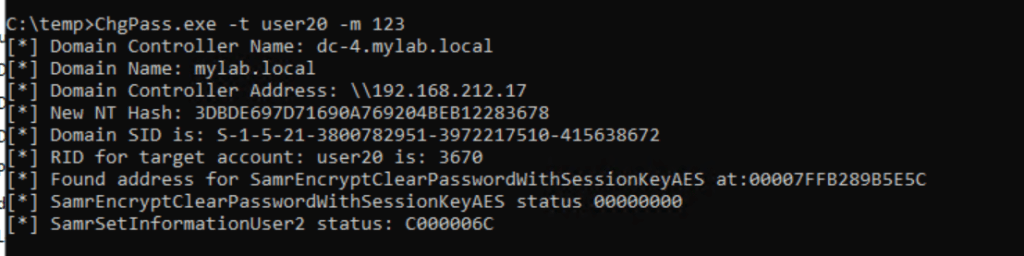
As expected, we get a C000006 error from the destination server, which means STATUS_WRONG_PASSWORD
the more complex way
We can’t stop here now that we’ve grasped the internal behavior. Is it possible to eliminate the internal functions and carry out the cryptographic operations using AES?
By examining the MS AES cipher implementation, we can find the necessary information:

First of all, what exactly is the CEK key? According to Microsoft, we need to retrieve the 16-byte SMB session key. This is where SystemFunction028 comes into play. Given a handle (server, domain, or user), it will return the SMB session key. The prototype for this function can also be found in the Mimikatz source code (!).

The CEK key is then used to calculate the encryption and message authentication keys. These tasks are carried out using various BCrypt* functions, which I won’t detail here, but you can find them in the source code.
In summary, we first generate the encryption key (enc_key) and the message authentication key (mac_key).
Next, we generate a random 16-byte salt (IV).
After that, we encrypt the password using the enc_key and the salt (IV). This method employs AES CBC, meaning the blocks are 16 bytes and require padding.
It’s important to note that the plaintext password passed to our encryption function should be in the following format
 typedef struct _SAMPR_USER_PASSWORD_AES {
         USHORT PasswordLength;
         WCHAR  Buffer [SAM_MAX_PASSWORD_LENGTH];
     } SAMPR_USER_PASSWORD_AES, *PSAMPR_USER_PASSWORD_AES;
The maximum password length is 512 bytes, corresponding to 256 Unicode characters (WCHAR).
The PasswordLength would then be calculated as: wcslen(password)*2
Finally, the buffer should be filled with random bytes starting immediately after the last character of the password.
We are now ready to do the final encryption:
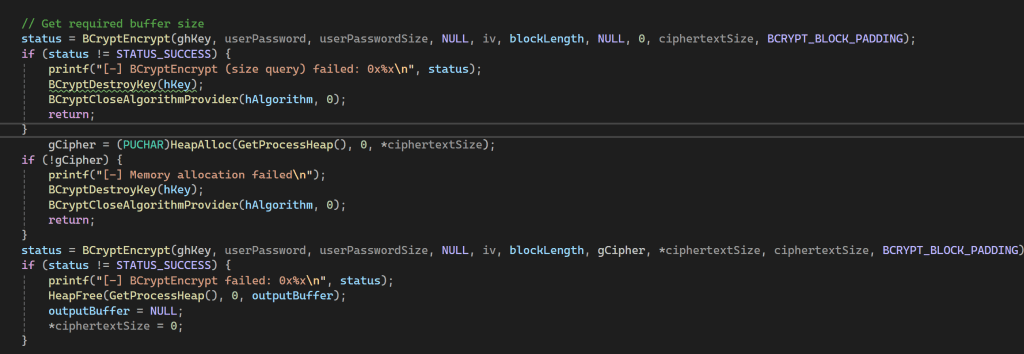
An after this perform the HMAC calculation and then call again SamrSetInfomationUser2()
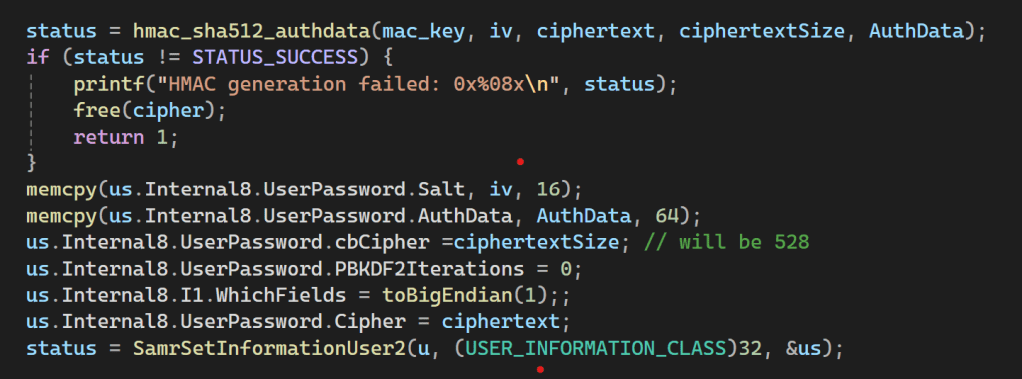
But surprisingly, I kept encountering the STATUS_WRONG_PASSWORD error. It drove me absolutely crazy, I was giving up when I discovered that the salt (IV) gets modified inside the BCryptEncrypt function. As a result, the HMAC calculation ended up using an incorrect salt. The solution was simple: I just needed to save the initial salt value and pass it to the final HMAC function, and after this, it worked 🙂
The final surprise
After these boring and tedious cryptographic operations, I wanted to work on something more interesting. While examining the IDL file and the exported functions, I came across the DSRM mode reset password functions:

The DSRM password is the password of the buil-in local administrator account on the Domain Controllers stored in local SAM and used for accessing the Directory Services Restore Mode.
Normally, the password reset is performed by the ntdsutil tool:
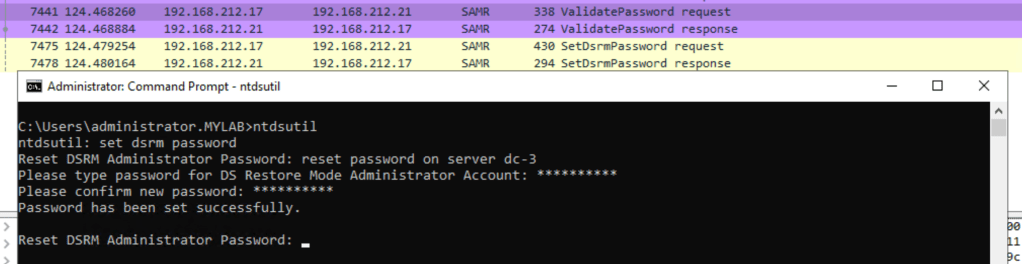
First, there is a call to ValidatePassword(), and if successful, the password is changed. However, attempting to set a blank password will result in an error.
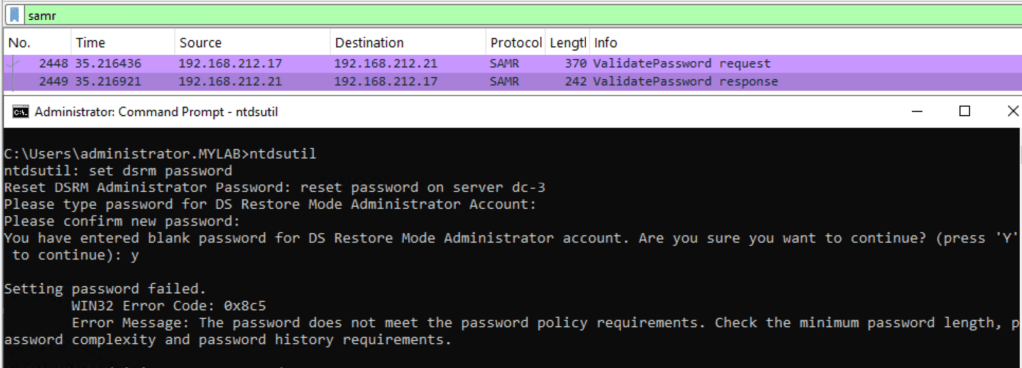
What if we call the SetDSRMPassword directly? It is already defined in the IDL file:
 long SamrSetDSRMPassword(
     /* [in] */ handle_t BindingHandle,
     /* [unique][in] */ PRPC_UNICODE_STRING Unused,
     /* [in] */ unsigned long UserId,
     /* [unique][in] */ PENCRYPTED_NT_OWF_PASSWORD EncryptedNtOwfPassword);
In this case, we need the BindingHandle returned by the PSAMPR_SERVER_NAME_bind() function, the UserID, which is the user’s RID (500), and the new password encrypted in the PENCRYPTED_NT_OWF_PASSWORD format. This last parameter corresponds to SystemFunction026, once again, thanks to the Mimikatz code.

We need to provide the NT hash of the new password and the user’s RID, and get we will get the encrypted NT hash.
With this encrypted NT hash we can try to reset the DSRM password:

And yes it works even with a blank password 😉
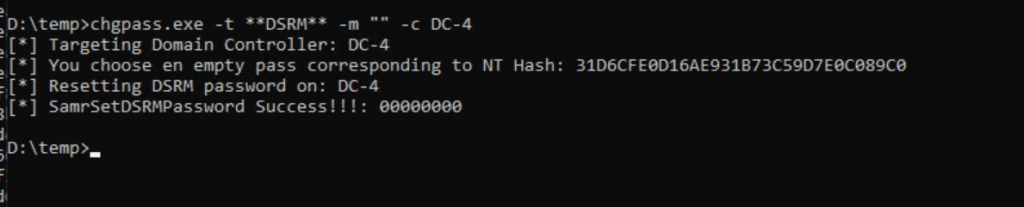
We were able to reset the DSRM password (if we have the necessary permissions) and bypass password restrictions 😉
So, would it be possible to use this “trick” to reset passwords other than the Administrator RID (500) and even on non-Domain Controllers? The answer is no. You will always encounter a C00000BB error, which means STATUS_NOT_SUPPORTED
Conclusion
This post is a brief summary aimed at organizing everything in a logical order. I spent a significant amount of time moving back and forth between Wireshark, WinDBG, Ghidra, MS-SAMR documentation, and code analysis to understand how it works and make it function my way. It includes only the essential parts necessary for understanding the process. Although it took some time, it was ultimately a rewarding experience that deepened my understanding, and yes, in the end, I did uncover at least one unintended behavior! 🙂
The code can be found here: https://github.com/decoder-it/ChgPass
That’s all 😉
 Decoder's Blog