LmCompatibilityLevel determines which NTLM and LM authentication protocols are accepted for inbound and outbound connections for Windows machines. On domain controllers, the minimum recommended setting is 3, but ideally it should be set to 5 to completely block incoming connections from clients still using the legacy NTLMv1 protocol.
In some cases, however, you may need to lower the level to support legacy hosts or applications that still rely on NTLMv1. Rather than weakening the configuration domain-wide, a common approach is to isolate those clients in a dedicated network segment, direct their traffic to a specific domain controller, and lower LmCompatibilityLevel only on that DC. This allows the rest of the domain to remain hardened.
At least, that was my assumption.
However, during testing I observed a completely unexpected behavior: when attempting authentication using NTLMv1 against other “hardened” domain controllers, the authentication still succeeded, which was both surprising and quite frustrating.
For my tests, I used a Python script to send raw NTLMv1 authentication packets, ensuring that this specific protocol was explicitly use
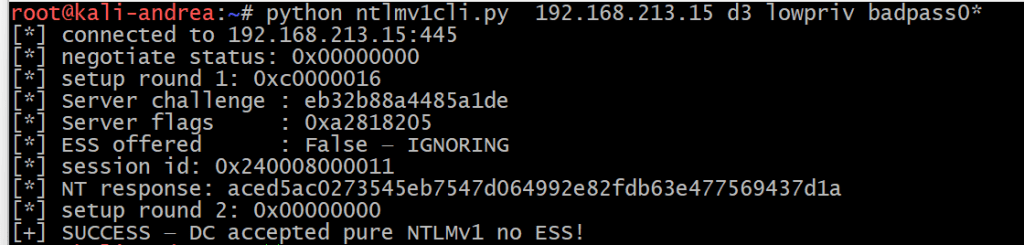
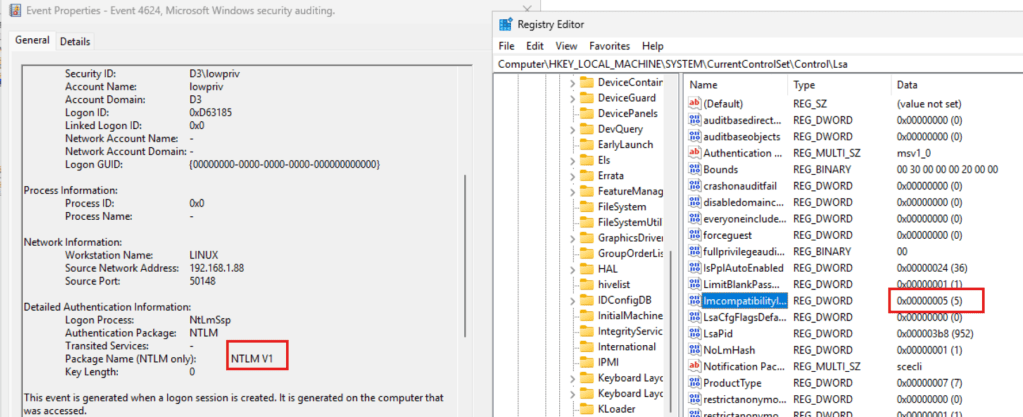
This was also confirmed in the Event Viewer: successful NTLMv1 authentication despite the LmCompatibilityLevel set to 5:
A quick look at wireshark capture showed something interesting

The authentication was forwarded to another domain controller via the Netlogon secure channel (IP address 192.169.213.10), where LmCompatibilityLevel was set to 3. This DC had also the PDC emulator role.
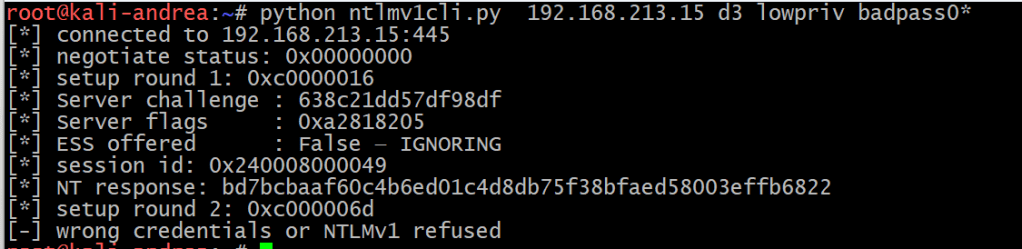
By setting the LmCompatibility to 5 on the PDC, I got the expected Access Denied:
Also confirmed in Wirershark:

So what is happening here?
The problem is that this architecture does not work the way you think it does. After reverse-engineering msv1_0.dll and ntlmshared.dll, I found that a non-PDC domain controller configured with level 5 does not reject NTLMv1.
Because it is not authoritative for the decision, it silently forwards the authentication request to the PDC emulator and lets it make the final call.
Without going too much in details, inside ntlmshared.dll, MsvpPasswordValidate() contains a gate controlled by GlobalSharedConfig (which maps to NtLmGlobalLmProtocolSupported, derived from LmCompatibilityLevel):
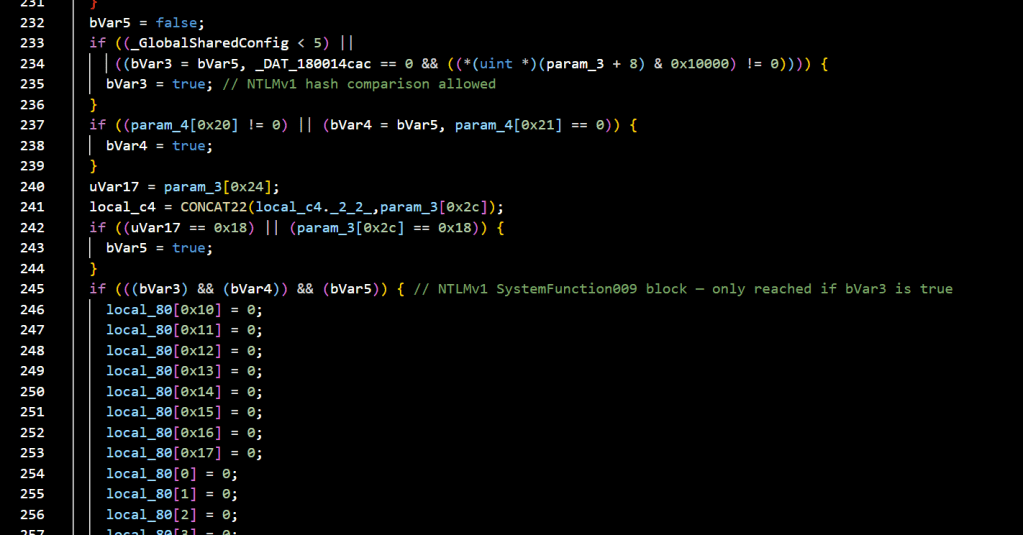
When the level is 5, bVar3 stays false and the NTLMv1 hash comparison is skipped entirely. The function returns false, causing STATUS_WRONG_PASSWORD. Back in MsvpSamValidate() ,in msv1_0.dll , the Authoritative flag is never set to 1 for this error, it stays at the default 0.
Netlogon interprets Authoritative=0 as “this DC cannot give a definitive answer” and forwards the NTLMv1 blob unchanged to the PDC emulator, which runs the same check under its own LmCompatibilityLevel.
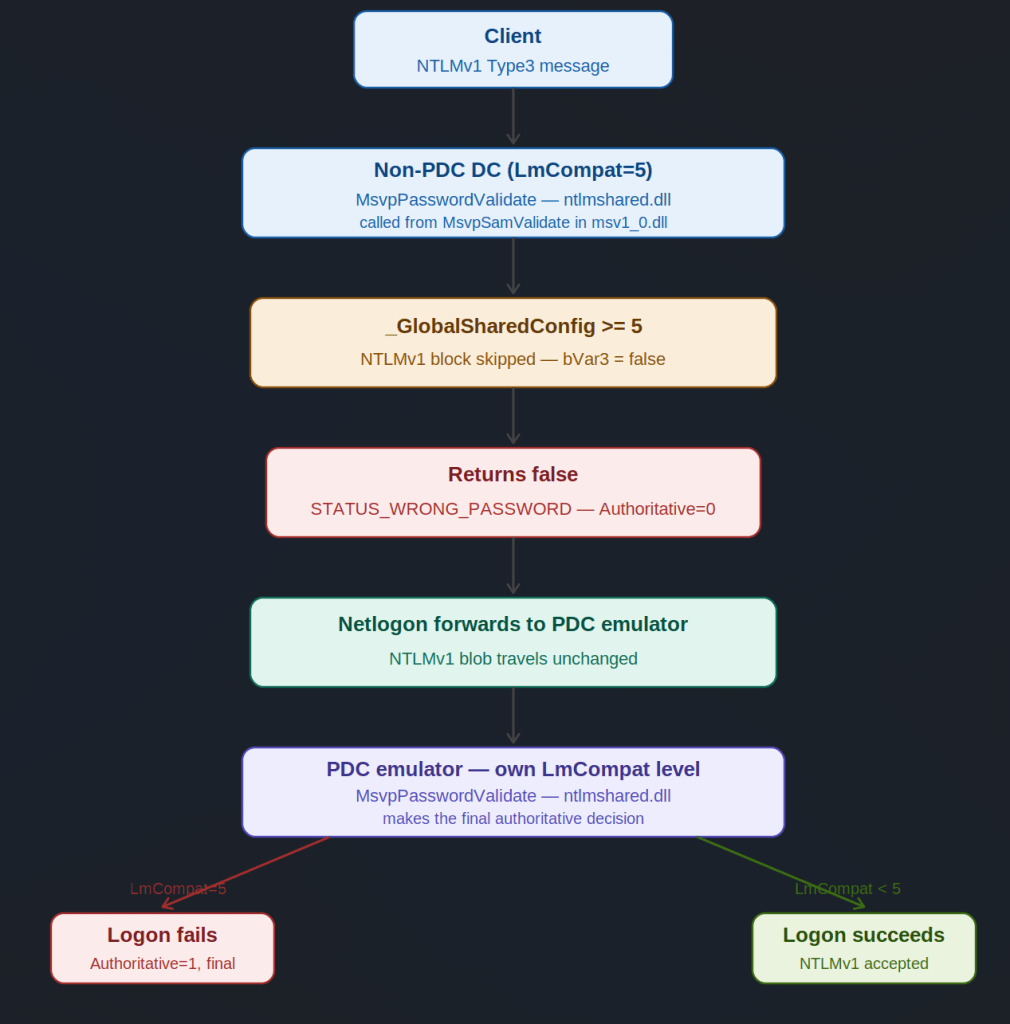
This means that lowering the level on any DC effectively lowers it for the entire domain if that DC happens to be the PDC emulator.
I tried to find documentation explaining or validating this behaviour but was unsuccessful, so I submitted it to MSRC as a security feature bypass. After an initial classification of “Important Security Feature Bypass”, they reconsidered and concluded it did not meet the bar for immediate servicing.
After further discussion explaining the real-world impact of inconsistent LmCompatibilityLevel configurations, they settled on medium severity with a fix planned for an upcoming future release.
My take: this is not something catastrophically dangerous on its own. But documenting this behaviour makes one thing clear, inconsistent LmCompatibilityLevel settings across domain controllers should always be avoided. The PDC emulator is the silent enforcement point for the entire domain, and administrators who believe they have contained NTLMv1 exposure to a single isolated DC may have a false sense of security.
This is also a good reminder that NTLM itself is on its way out , Microsoft has announced plans to deprecate it, and any remaining dependency on NTLMv1 in your environment is technical debt worth eliminating sooner rather than later.
That’s all 😉

